
What Is a Travel CRM? A Plain Guide for Indian Travel Agencies and Tour Operators
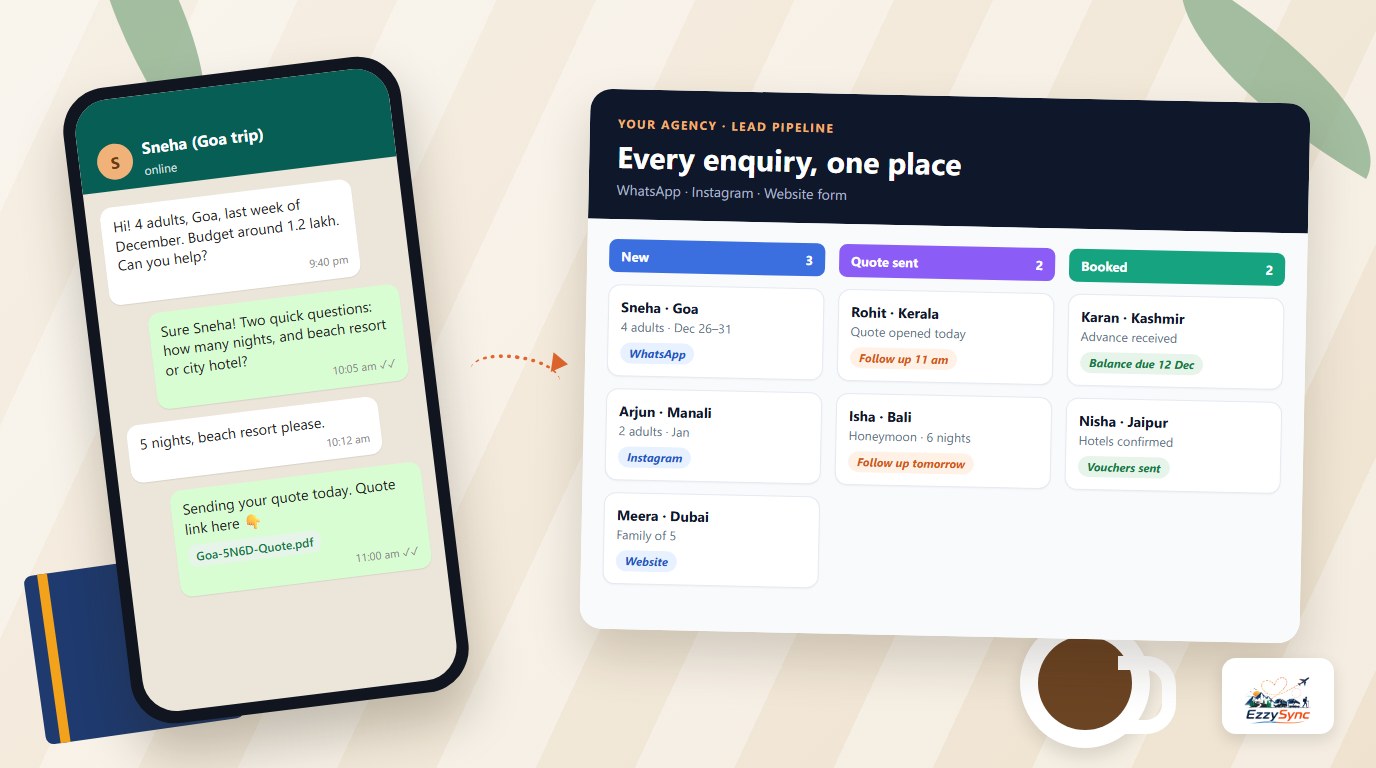
If you run a travel agency in India, you already have a system. It is a mix of WhatsApp chats, an Excel sheet, a few Word itineraries, a notebook of follow-ups and your own memory. It works until the day you get twenty enquiries after a festival ad, and three of them go quiet because nobody called back.
That gap is what a travel CRM is built to close. This guide explains what a travel CRM is, what it does on an ordinary working day, how it differs from Excel and from a generic CRM, and how to decide whether your agency needs one now or later.
What is a travel CRM, in one paragraph
CRM stands for customer relationship management. A travel CRM is software that keeps every enquiry, customer, quotation, booking and payment of a travel business in one place, and reminds your team what to do next. A generic CRM tracks "deals" and "contacts". A travel CRM understands trips: a destination, travel dates, number of travellers, a day-wise itinerary, hotels, a quote with GST, an advance and a balance.
The simplest way to think about it: your WhatsApp inbox is where customers talk to you, and the CRM is where you remember what they asked, what you promised and what happens next.
The problem it solves, with a real-looking day
Take a small agency with three sales staff. On a Monday morning there are fourteen new WhatsApp enquiries from the weekend. Some came from an Instagram reel, two from a Google search, one from a customer's cousin.
Without a system, this is what usually happens:
- One person replies to the first six and forgets the rest.
- Nobody notes which enquiry is for Goa and which is for Kashmir, so quotes are sent late.
- Two staff members reply to the same customer with two different prices.
- A hot lead who asked for a quote on Saturday hears nothing until Thursday, by which time another agency has sent a PDF.
- When a staff member goes on leave, their chats and Excel rows go with them.
None of this is about effort. It is about memory. A person can hold ten conversations in their head, not forty. A CRM holds the other thirty for you.
What a travel CRM actually does
Strip away the marketing and a travel CRM does six jobs. If a tool does not do these well, it is not a travel CRM, whatever its name says.
Captures every enquiry in one place
Leads come from WhatsApp, Instagram messages, your website form, phone calls, walk-ins and referrals. A good travel CRM brings the digital ones in automatically and lets you add the others by hand or by importing an Excel or CSV file. Each lead carries the basics: who they are, where they want to go, their budget, where they came from and which team member owns them.
A dedicated lead management view shows these as a pipeline you can drag from stage to stage, for example New, Contacted, Requirements gathered, Won and Lost, with the total value sitting in each stage.
Tells you who to call today
This is the feature owners notice first. Instead of searching through chats, your team opens one list: leads whose follow-up is due today, new leads nobody has touched, and leads that have been pending too long. From that list they can call, open WhatsApp or send an email in one tap.
The software reminds and opens the chat. The agent still writes the message, which is how it should be for a business built on trust. If follow-ups are your weak point, read how to automate travel agency follow-ups alongside this guide, and see how follow-up tracking works inside a CRM.
Connects WhatsApp to the lead
For Indian agencies, WhatsApp is not a side channel. It is the main one. A travel CRM links each chat to a lead, so anyone on the team can open the lead and see the whole conversation, not just their own messages. A shared team inbox on one business number also means customers do not get different answers from different people.
If you want to understand the technical side of the official route, the WhatsApp Business API setup guide for travel agencies explains it step by step, and the WhatsApp CRM feature page shows how this looks in EzzySync.
Builds itineraries and quotations
A travel business sells a plan, not a product off a shelf. So a travel CRM includes a day-wise itinerary builder: sightseeing, hotel stays, transfers and flights for each day, with inclusions and exclusions listed. You can duplicate an old itinerary for a similar trip instead of retyping it.
From the itinerary you build a quotation that adds up the cost, applies GST and shows the total and the per-person price for groups. You share it as a mobile link or a PDF on your own letterhead, and you can see whether the client has accepted it. If you want to try the itinerary side before anything else, the free itinerary builder works without a login.
Turns accepted quotes into bookings
Once a client says yes, the same record becomes a booking. You note the hotel and room for each stay, mark each hotel confirmed or pending with its voucher number, assign drivers and keep an upcoming trips view sorted by departure date. For group departures, you track seats filled against capacity.
This matters because the most expensive mistakes in travel operations happen in the gap between "client said yes" and "hotel confirmed". Booking management in one system closes that gap.
Tracks money
You record an advance and each instalment per booking and always see the balance due. You raise GST invoices with your own prefix and terms, download them as PDF and send them over WhatsApp or email. At the end of a trip you can compare what you collected against what you spent on hotels, transport and other costs.
Travel CRM vs Excel: where Excel stops working
Almost every agency starts with Excel, and for the first month or two it is fine. A sheet with name, phone, destination and status is a perfectly good start. The trouble begins at a predictable point.
| Situation | Excel | Travel CRM |
|---|---|---|
| Two people update the same sheet | Overwrites, version copies, "final_v3" | One live record |
| Reminder for tomorrow's call | You must remember to look | A due list opens each morning |
| WhatsApp chat history | Lives on someone's phone | Linked to the lead for everyone |
| Staff leaves | Their sheet leaves with them | Leads are reassigned in a click |
| Quote with GST and instalments | Manual formula, easy to break | Calculated and saved with the booking |
| "How many Goa leads did we win this month?" | Filter, count, hope | A report from live data |
There is a full comparison on the travel CRM vs Excel page. The short version: Excel is a good notebook and a poor system. The day you need two people to work from the same data, or a reminder you cannot forget, it has reached its limit.
Travel CRM vs a generic CRM
Zoho, HubSpot and similar tools are excellent CRMs. They are built for a salesperson moving a deal through stages. A travel agency needs that, and also needs things a generic CRM does not have out of the box.
- A trip is not a deal. You need destination, dates, travellers, a day-wise plan and a package price, not just "amount" and "close date".
- Quotes need GST logic for tour operators, with per-person pricing for groups.
- Hotels and vouchers need their own records: properties, room categories, cost versus selling rates, confirmation status.
- Payments come in parts: an advance, then instalments, then a balance before departure.
- Your customer lives on WhatsApp, and the chat has to sit next to the lead.
You can bend a generic CRM to do all this, with custom fields, extra modules and a consultant. Many agencies do, and it works if you have the time and budget. If you want to see how the two approaches compare in practice, read the generic CRM comparison and the page on Zoho CRM for travel.
Who needs a travel CRM, and when
Not every agency needs one on day one. Here is a simple test.
You probably need one now if:
- You get more than about ten enquiries a week and some go unanswered.
- More than one person replies to customers.
- You have lost a booking because of a missed follow-up.
- You cannot say, without searching, how many quotes are open right now.
- You sell group departures or multi-hotel packages where confirmations pile up.
You can wait if:
- You are one person with a handful of enquiries a week and you remember all of them.
- Most of your business is repeat customers who message you directly.
Even then, starting early is cheaper than migrating later. Moving two years of customers out of Excel and WhatsApp is much harder than adding them as you go.
For a solo consultant the setup is light, and the page for travel consultants shows what that looks like. Teams selling packages will find more relevant detail on the travel agencies and tour operators pages.
What to look for when you compare tools
Whichever tool you consider, test it against your own Monday morning, not against a demo. These questions separate a real travel CRM from a general one with a travel label.
- Can you add a lead in under 20 seconds from your phone? If it is slow, your team will stop using it.
- Does WhatsApp sit inside it? Check whether you use your own business number, and what happens to the chat history.
- Can you build a day-wise quote with GST and send it as a PDF on your letterhead?
- Does it handle advance and balance payments per booking?
- What happens when a staff member leaves? You should be able to reassign their leads without exporting anything.
- How is your data separated from other agencies?
- What does it cost for the whole team, not just one login? Look at the price for the number of people who will actually use it, and check the pricing page of any tool you compare, including ours.
- Can you bring your Excel in? Importing from CSV should be possible on day one.
If you want a ready shortlist, the best travel agency CRM software in India compares several options side by side.
A worked example: one enquiry, start to finish
Here is how a single enquiry moves through a travel CRM.
Saturday, 9:40 pm. A customer messages your business WhatsApp number: "4 adults, Kerala, Dec second week, budget around 1.2 lakh." The chat appears in the shared inbox and the CRM creates a lead with the source marked as WhatsApp.
Sunday, 10 am. Priya, who owns the lead, opens her due list, sees the new lead at the top and replies with two questions: number of nights and hotel preference. She sets a follow-up for Monday 11 am.
Monday, 11 am. The reminder surfaces. Priya has the answers, builds a five-night itinerary from a saved Kerala template and adjusts one day. The quote shows ₹1,18,000 for four travellers, with GST, inclusions and exclusions. She sends it as a link on WhatsApp.
Tuesday. The CRM shows the client opened the quote but has not accepted. Priya calls. The client wants a better hotel in Munnar. She edits the itinerary, and the new total is ₹1,24,500.
Wednesday. The client accepts. Priya converts the quote to a booking, records a ₹30,000 advance and sets the balance due date. The hotel entries show as pending until each voucher number is added.
At no point did she search through chats, retype a customer's details or ask a colleague what was promised. That is what the software is for.
Common mistakes when adopting a travel CRM
Importing messy data and expecting clean results. Clean your Excel first. Remove duplicate phone numbers and obvious junk before importing.
Buying for features you will not use. A small agency needs lead tracking, WhatsApp, itineraries and quotes working well before it needs advanced reports.
Not choosing one owner. Pick one person to set it up and train the rest. A tool with no owner becomes a second Excel sheet.
Running the old and new systems together for months. Pick a cut-over date. After it, a lead that is not in the CRM does not exist.
Skipping the follow-up habit. The CRM only helps if the team opens the due list every morning. Make it the first thing anyone does at the desk.
Frequently asked questions
What is a travel CRM in simple words?
It is software that keeps all your enquiries, customers, quotes, bookings and payments in one place, and reminds your team who to follow up with each day. It is designed around trips, so it handles itineraries, hotels, GST quotes and advance-and-balance payments, which a general CRM does not handle well.
Is a travel CRM only for big agencies?
No. Independent consultants and small agencies often benefit most, because one missed follow-up is a larger share of their income. Plans usually start with one login, so you can begin alone and add team members as you grow.
Can I use Excel instead of a travel CRM?
You can, and many agencies start there. Excel stops working when two people need the same data, when you need reminders you cannot forget, or when WhatsApp chats must stay linked to leads. At that point a CRM saves more time than it costs.
Will a travel CRM send follow-up messages for me?
In EzzySync, the CRM reminds you and opens the chat, but you write and send the message. That keeps the personal touch that customers expect from a travel agent, while making sure no one is forgotten.
How long does it take to start using one?
A solo agent can be working in a day: import your Excel, connect WhatsApp, and add your first itinerary. A team usually needs a week to settle the routine, mainly agreeing who owns which leads and making the daily follow-up list a habit.
Try Our Free AI Itinerary Generator
Create branded, day-wise itineraries in 30 seconds for your clients with zero sign-up.